¶ Maven Documents Dyscophus Release Notes
¶ Release Summary
New season—new release. We can't stop coming up with ideas on how to modify Maven Documents. Yet another version contains some new features alongside improvements and bug fixes.
You can use the following link to install or upgrade the application.
¶ New Features
¶ Support of different locales
Define in the Document Template in what locale data is displayed in the generated document.
¶ Google Granular Consent
Fine-tune the authorization process by giving access only to things that the application needs.
¶ Upgrading Notes
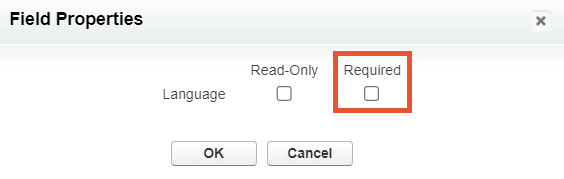
Once you upgrade the application, you would need to make the Language field on the Template Label object non-required:
-
In Setup, go to the Template Label Object settings and open its Page Layout.
-
Find the Language field and click on the spanner icon next to it.

-
Unmark the Required checkbox and click OK.
-
Save the layout.
¶ Improvements
- The Description field on the Document Solution and Document Template records' layout.
- The Document Request record reflects all the data from the Document Template used for generation.
- Error messages became more informative and descriptive.
¶ Fixes
- If there are a couple of Field Update Actions on one Document Solution, only the latest Field Update Action updates the field value.
- Values from the Microsoft Template URL and Folder Path fields are not imported via the Import functionality.
- The Before Merge Preview feature doesn't work as expected for Google templates.
- The Include element doesn't work as expected in online DOCX templates.
- The Before Merge Preview of Google Templates doesn't work correctly.