¶ Maven Documents Anisoptera Release Notes
¶ Release Summary
We are keep making Maven Documents more versatile and powerful. This release is not an exception. We developed 4 new features to make your work more advanced and safe at the same time.
You can use the following link to install or upgrade the application.
¶ New Features
¶ Embed JSON metadata into a generated document
Add some extra data to the PDF or DOCX document you generate, by inputting JSON content into a Document Request.
¶ Define access level to the generated OneDrive documents
The generated document on OneDrive can be edited or only viewed by anyone who has a link. There is also an option to add emails of users who should have access to the file.
¶ Set the PDF Conformance level of the generated document
Change the default Conformance level of the PDF file you generate.
¶ Set the PDF version of the generated document
Change the default version of the PDF file you generate.
¶ Upgrading Notes
-
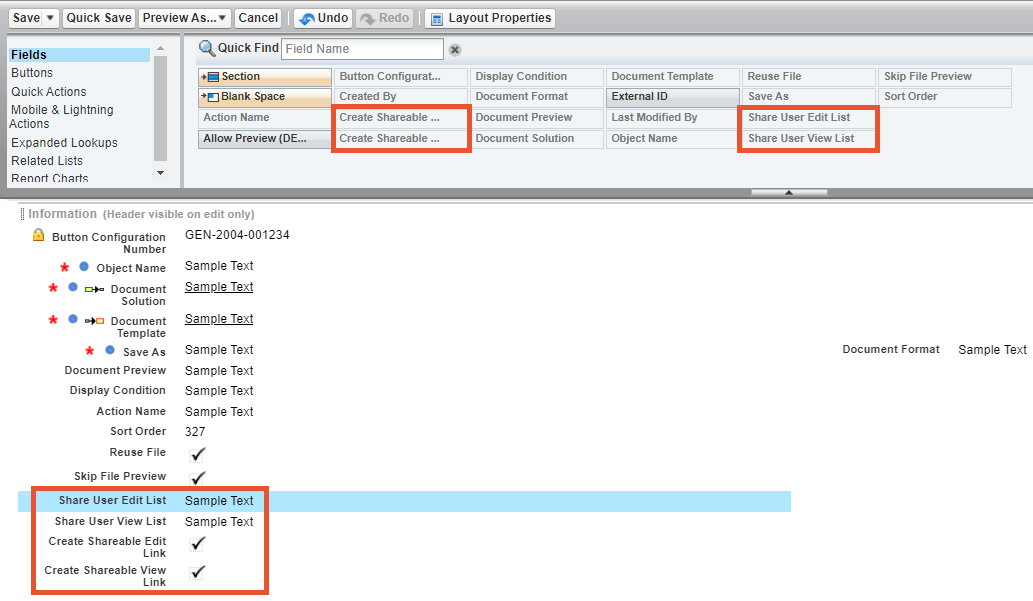
There are some steps to fin-tune the application after the upgrade:
In the Setup settings, drag the following fields to the Page Layout of the Button Configuration Object:- Share User Edit List.
- Share User View List.
- Create Shareable Edit Link.
- Create Shareable View Link.
-
Important thing to take into consideration. With the new release we've changed the way how generated OneDrive documents are stored.
For Document Solutions from previous versions, you won't see any difference. But if newly created Document Solutions have Document Templates that save the document on OneDrive, after generation, nothing is stored on Salesforce. All the files from now on are placed on OneDrive only.