¶ FAQ. Maven Add-in and Add-on
¶ Is the Maven Add-on for Google Docs and Google Sheets free? Where can I download it?
- Yes, the Maven Add-on is free. You can download it at this link. More information can be found in our documentation. Please note that the Add-on is just an add-on to the Maven Documents product that helps you build templates with data fetched from your Salesforce instance.
¶ Is the Maven Add-on available only for Google Docs and Sheets?
- No, it's not. You can use it on DOCX and XLSX files. And it's free as well. Follow the link to download it. Further instructions you can find in our documentation
¶ I can't find Variables as elements on the Maven Add-on and Maven Add-in after I update Maven Documents to version 4.0.0. Could you help me get them back?
-
Starting with version 4.0.0, the Variable element from the Maven Add-on and Maven Add-in is replaced with Global Variables defined in Query Builder. With this change, you only need to create them once and then use them further in the Maven Add-on and Add-in.
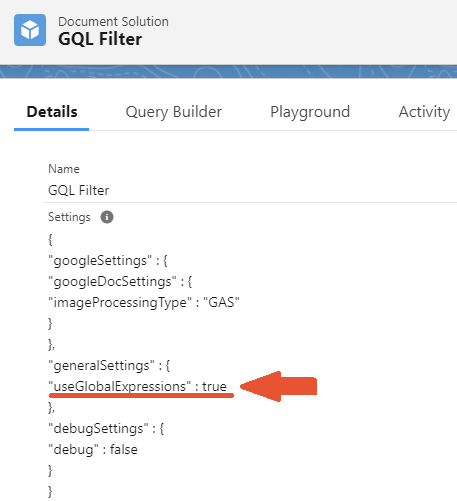
But if you like to have things the old way, there is an option to do so by redefining the useGlobalExpressions attribute in the Settings field.Here are quick instructions:
- Add the Settings field to the Document Solution page layout
- Go to your Document Solution and define the useGlobalExpressions attribute as "true"
¶ Where can I get help if I have issues or suggestions for Maven Add-on?
- If you are haveing issues with the Maven Add-in or Add-on, check instructions in the following page.
¶ I get an “Authorization is required” error after running the Maven Add-on. What authorization is required if I’m already logged into my Google account?
- This error usually occurs when you are signed into different Google accounts in your Chrome browser profile and in the Google Document where the Add-on is being used.
¶ How to fix:
Make sure you are logged into Chrome with the same Google account that is used to open the Google Document. This should resolve the authorization issue in most cases.